Showing posts with label Free. Show all posts

Sunday, 15 January 2012

Make Firewalls and Antivirus Compatible


Different people like different security programs. Some rely on security suites, where as others rely on their own custom made suites (combination of antivirus and firewall from different vendors). Those who rely on security suite, will not experience any compatibility problems. Because, the company which develop these suites will take enough care while developing, so that antivirus and firewall of that suite will go hand in hand. But, things will be different for those who use separate antivirus and firewall. I personally experienced many problems like  slow boot times, slow application startups, slow internet speeds, etc. when I installed antivirus and firewall from different vendors. In this article we’ll see how to make antivirus and firewall compatible. This article is intended for newbies who don’t know how to tackle the above said problems.

Make them Friends :

Recently, I installed Online Armor Premium. I’m already using AVG Free 2012 to protect my PC from malware. But after installing OA (Online Armor) Premium, my PC has become dead slow, taking around 3 minutes to complete boot process. Not only that, I can also feel the slowness of PC when running applications and browsing. After a while, I came to know the reason. The reason is this. Both, AVG and OA Premium are aggressively monitoring each others processes. Instead of working together to fight malware, they are wasting both time and CPU resources by suspecting each other processes and behavior. This issue, is not just limited to OA Premium and AVG. Many security combinations are like this.
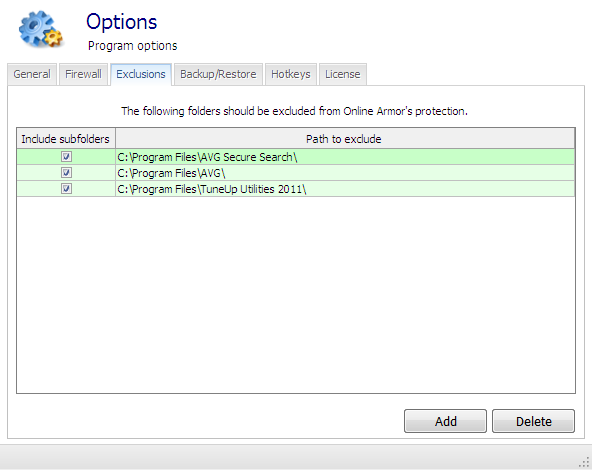
Adding AVG to Online Armor Premium whitelist
Adding AVG to Online Armor Premium's Exclusion list
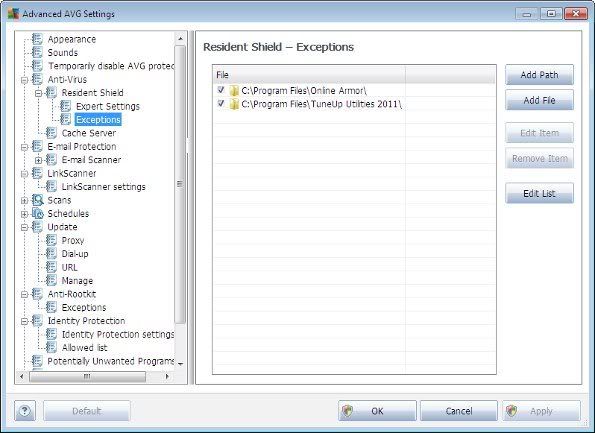
Adding Online Armor to AVG's Exclusion List
Adding Online Armor to AVG's Exception List
We can solve this issue by stopping them from monitoring each other processes. This can be implemented by using the Exclusion/Whitelist feature of that corresponding security product.
Every security product will offer these kind of settings. So, if you are facing any problem with your security setup then check out the settings of your program and add folders of Antivirus to Firewall’s exclusion list and add Firewall’s folders to Antivirus exclusion list.

Disable Redundant Protection Modules :

Every security vendor tries to include as many features and modules into their products, so as to make sure that the end-user will have an optimum protection. Actually this is intended for good. But in the end, people who use their own custom security combination will end up having repeated modules. In my case, both AVG and OA Premium have their own :
  • Web Shields
  • Program monitoring.
So, when I browse web, both AVG and OA will be scanning web traffic. Eventually slowing down page load times. Same is the case, when I run any program. Both AVG and OA will be monitoring program’s behavior and because of this the software will become unresponsive at times.
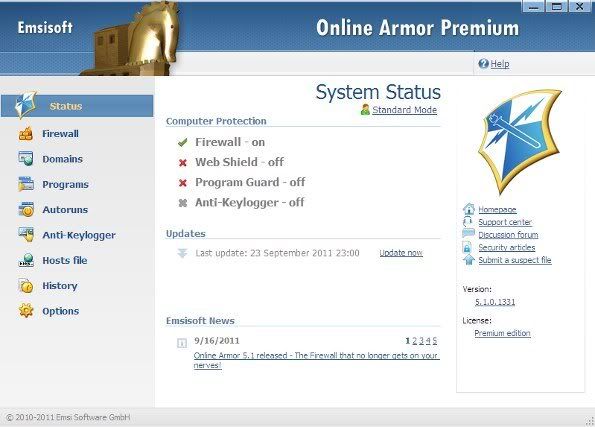
Disabling repeatitve protection modules
So, instead of having two programs doing the same job, it is better to turn off any one of them and hence avoiding unnecessary slow downs.
After performing above two steps, my system boot time has decreased to 1 min 30 seconds, from the previous 3 mins. So, if you are facing any slow downs after installing Firewall or Antivirus, then do the above two steps and feel the difference.

Tuesday, 10 January 2012

Free Capture Screen Shots Softwares


capture screen shots Free Capture Screen Shots SoftwaresScreen Capture Tools are very important for Bloggers and web designers. Adding pictures and screen shots in a post can increase your traffic, because there are lots of image search engines, which can providefree traffic to your blog.
Your blog post will attract readers, if there isimages in post because pictures are more attractable as compare to the text. Post with plenty of text can bore your readers.
Make it your habit to add cool images in your posts and for that you can use thesefree applications to capture a great and quality images.
These are the advance and useful screen shot capturing application available on the web. It can help allot in your blogging.
10 Free Services for Screen Shots
Screen Hunter provide free and paid service for screen capturing. If you are moreadvance user and need bulk of screen capturing then you have to buy the paid version, but if you are a blogger and only want to capture screen shots for your blog posts then you can use the free version of Screen Hunter.
Fast Ston Capture is another free screen capture provider. Capture screen shots with quality using its great features. It can save your capture screens in BMP, JPEG, PNG and TGA formats.
It provides you different features including screen capturing. It can re-size, edit and add extra affect to the images.
Screen Capture allow you to capture screen shots using its free service. You can register account with screen capture for free, and then capture screen shots forever.
support drag and drop functionality and you can drag your captured screen shots to email with just a one click. You can use all of its features for free.
Capture Me is another great and enhance screen capturing tool. You can use this for free. It is a great application to capture quality images for your blog posts.
Screen Grab is an extension for Firefox that makes it easy to save a web-page as an image. Use this extension in your Firefox and make your blogging easy and fast.
Another handy tool for bloggers is Gidwin Screen Shot.  It allows you to capturescreen shots with a single click. You can also rezise you screen shots for feting it in your blog posts.
Take cool and quality snaps from your selected websites, softwares and other applications. It adds cool effects and resize the image. You can save image in any format.
SCP is a professional screen capturing application. This is a very easy application and needs no guidelines.

Free Nero Alternatives-CD,DVD Burning Softwares


free nero alternatives Free Nero Alternatives CD,DVD Burning SoftwaresCD and DVD writer is now very important for very computer user, although USB has made it very easy for you to copy and store your data but if you want to permanently store your data then it is the best option to store in a DVD or CD.
You need Nero for burning CDs OR DVDs, but if you can’t afford to buy Nero, then you can use these free alternatives for nero. Nero is not the end, you can still use lots of good and free softwares forburning.
These free softwares has the ability to satisfy your needs. You get the same features from these free alternatives as Nero is providing. This is a fact the freeversions OR free stuffs has some limitations, but still it can help you to complete your work. Give a try to these free nero alternatives.

5 Free Nero Alternatives

1:- Burn4free

Burn4free is a free CD,DVD burner softwares. (Allowed Formats FLAC, WAV, WavPack and M3U). It also support multi languages. Features like Select different colors and layouts to print, DVD dual layer, free online upgrades and save in .ISO files etc are supported by burn4free.
Visit Here:- http://www.burn4free.com

2. StarBurn

Start Burn is one of the most popular alternative for Nero. It is totally free and allow grabbing, copying and burning operations. Keep your orignal Disc damage free and burn it to a new one for free.
Visit Here:- http://www.rocketdivision.com/starburn.html

3. ImgBurn

Img burn is a lightweight blu ray burning application and is totally free. Createimage file from your disk OR write it direct to a disk. You can also check the quality of your burned dis through ImgBurn.
Visit Link:- http://www.imgburn.com

4. Express Burn

If you are not able to buy Nero, then try express burn for free and burn CDs andDVD.It provides fast burning is less time and burn files and videos to DVD, CD or blu-ray. Express Burn also support drag and drop feature. The free version is only available for CD burning, try it now.
Visit Link:- http://www.nch.com.au/burn/index.html

5. Deep Burner

There are two versions of Deep Burner, No.1 PRO and No.2 Free for both DeepDVD Movie and DVD Ripper. You can try the free version for both softwares.
Visit Here:- http://www.deepburner.com/?r=download

ADVERTISEMENT

Related Posts Plugin for WordPress, Blogger...